
Building latest generation event-driven business solutions
After 40+ years in IT, experiencing many technologies and methodologies, I feel that we slowly arrived at a point that Development and Operational IT processes reached full End2End integration with solutions like Azure DevOps. With modern architectures and technologies like event-driven MicroServices and Kafka that allows real-time messaging between microservices. This all together allowing us to build high available, flexible systems that helps businesses to quickly adapt their processes and apply changes to their backing systems with little effort.
Building Real-Time Hybrid Architectures with Cluster Linking and Confluent Platform 7.0
"Companies are increasingly moving to the cloud, undergoing a transition that is often a multi-year journey across incremental stages. Along this journey, many companies embrace hybrid cloud architectures, either temporarily or permanently, where some applications run on-premises and some run in the cloud. However, unifying data across on-premises and cloud environments is immensely challenging, as most legacy applications are not cloud-ready and have many dependencies and integrations with existing on-premises infrastructure".
Data is your business (DataOps with Lenses for Kafka)
It's time to believe the hype,every digital transformation needs a data transformation. Our world has been disrupted by the Coronavirus, and this has introduced a new urgency to reduce costs as well as discover and build digital revenue streams. The difference between thriving and surviving now hinges on our ability to make data actionable to more than a few technical "a-listers".
The winners in this new race are working fewer weekends, and investing in modern data platforms that enable real-time decision-making.
What is the Role of a Java Solutions Architect
A solutions architect is responsible for creating a comprehensive architecture for a software solution and providing strategic direction throughout the development process, Their tasks usually begin from choosing the right technology solution for the business problem(s) .
- Notifies stakeholders about any issues connected to the architecture.
- Fixes technical issues as they arise.
- Supervises and guides development teams
- Continuous researches emerging technologies and proposed changes to the existing architecture.
Technical Skills. Expectedly, the role of a solution architect requires technical education and hands-on experience across
all major areas of the software development process.
One of the reasons the Agile movement has been so successful, over more than 10 years, has been its foundational principles expressed in the Agile Manifesto. However, principles can be abused and the rise of pseudo-principles leads to Agile bureaucracy that reduces the very adaptability and flexibility that the Agile movement was all about in the first place.
Furthermore, what happens in too many organizations is that practices become static and then quietly elevated to the level of principle—something that can't be violated. A good practice, "daily standups," becomes bureaucratic when it's interpreted as "You must do daily standups, or else!" When questioned, the proponents of this newly crowned principle usually respond with "well, Joe Jones who wrote the book on Agile says so on page 48." They loose track of why they are using the practice and it becomes a de facto standard rather than a guideline.
How to escape your Scrum prison (medium)
The key has been adhering to the "end-to-end principle" and working in multidisciplinary teams, or squads, that comprise a mix of marketing specialists, product and commercial specialists, user-experience designers, data analysts, and IT engineers—all focused on solving the client's needs and united by a common definition of success. We gave up traditional hierarchy, formal meetings, overengineering, detailed planning, and excessive "input steering" in exchange for empowered teams, informal networks, and "output steering." You need to look beyond your own industry and allow yourself to make mistakes and learn. The prize will be an organization ready to face any challenge.
 GO - aka Golang
After having experienced 10+ years of C programming in the 80's, it is like feeling coming home again. We go functional, statically typed and native running again, how nice.
Golang is a programming language you might have heard about a lot during the last couple years. Even though it was created back in 2009, it has started to gain popularity only in recent years. According to Go's philosophy (which is a separate topic itself), you should try hard to not over-engineer your solutions. And this also applies to dynamically-typed programming. Stick to static types as much as possible, and use interfaces when you know exactly what sort of types you're dealing with. Interfaces are very powerful and ubiquitous in Go.
Some features....
- Static code analysis: Static code analysis isn't actually something new to modern programming, but Go sort of bring it to the absolute.
- Built-in testing and profile: Go comes with a built-in testing tool designed for simplicity and efficiency. It provides you the simplest API possible, and makes minimum assumptions
- Race condition detection: concurrent programming is taken very seriously in Go and, luckily, we have quite a powerful tool to hunt those race conditions down. It is fully integrated into Go's toolchain.
Some reads:
- Here are some amazing advantages of Go that you don't hear much about
- The love of every old school C programmer, pointers
- Quick intro for the java developer
- From the source
- The Evolution of Go: A History of Success
- Parsing Spring Cloud Config content example
- Reading configs from Spring Cloud Config example
- An interface is a great and only way to achieve Polymorphism in Go
- Understanding the GOPATH
- https://stackoverflow.com/questions/27477855/how-to-run-a-go-project-in-eclipse-with-goclipse-installed
operator
CoreOS introduced a class of software in the Kubernetes community called an Operator. An Operator builds upon the basic Kubernetes resource and controller concepts but includes application domain knowledge to take care of common tasks.
Like Kubernetes's built-in resources, an operator doesn't manage just a single instance of the application, but multiple instances across the cluster. As an example, the built-in ReplicaSet resource lets users set a desired number number of Pods to run, and controllers inside Kubernetes ensure the desired state set in the ReplicaSet resource remains true by creating or removing running Pods. There are many fundamental controllers and resources in Kubernetes that work in this manner, including Services, Deployments, and Daemon Sets. There are two concrete examples:
- The etcd Operator creates, configures, and manages etcd clusters. etcd is a reliable, distributed key-value store introduced by CoreOS for sustaining the most critical data in a distributed system, and is the primary configuration datastore of Kubernetes itself.
- The Prometheus Operator creates, configures, and manages Prometheus monitoring instances. Prometheus is a powerful monitoring, metrics, and alerting tool, and a Cloud Native Computing Foundation (CNCF) project supported by the CoreOS team.
Read about the operator framework. This is my first take on learning and practising my first operator. The goal is to introduce a new operator to more flexible manage application configuration on ConfigMaps. For this read Could a Kubernetes Operator become the guardian of your ConfigMaps and Kubernetes Operator Development Guidelines
- Writing Your First Kubernetes Operator
- Getting started with the Operator SDK
- Operator SDK CLI reference
- https://sdk.operatorframework.io/
- Operator SDK Samples - Go
- Client Go - authentication inside a cluster
Functional Programming Paradigm
Functional programming is a programming paradigm in which we try to bind everything in pure mathematical functions style. It is a declarative type of programming style. Its main focus is on "what to solve" in contrast to an imperative style where the main focus is "how to solve". It uses expressions instead of statements.
Pure functions: These functions have two main properties. First, they always produce the same output for the same arguments irrespective of anything else.
Second, they have no side-effects i.e. they do modify any argument or global variables or output something.
Later property is called immutability. The pure functions only result is the value it returns. They are deterministic. Programs done using functional programming are easy to debug because pure functions have no side effect or hidden I/O.
- Functional Programming Paradigm
- Function Interface in Java
- Functional Programming with Java 8 Functions
- Difference between <? super T> and <? extends T> in Java (PECS Producer Extends Consumer Super)
- Understanding Java Generics’ super and extends
- Spring Boot Microservices – Fastest Production Ready Microservices
- Prepare yourself
Spring XD (eXtreme Data)
is Pivotal’s Big Data play. The Spring XD team have identified ingestion, real-time analytics, workflow orchestration, and export as being four major use cases common to creating Big Data solutions.
- Spring XD 1.2 GA, Spring XD 1.1.3 and Flo for Spring XD Beta Released
- Introducing Spring XD, a Runtime Environment for Big Data Applications
Springboot & Cloud Blog and Milestones
Building your own API Gateways with Springboot
You may find your self choosing between Springboot/React Direct or BFF patterns. Direct accessing your API's directly from your ReactJS UI might be tempting and easy to set up and quite sufficient for relatively small apps, but causes quite a few challenges that become more and more apparent and troublesome as your application grows in size and complexity. BFF brings you the challenge of managing traffic up and down, when ou are not able to have API gateways on your productive environments. What about building your RouteLocationBuilders directly on your BFF back-ends. Spring Cloud Gateway forwards requests to a Gateway Handler Mapping – which determines what should be done with requests matching a specific route through dynamic routing.
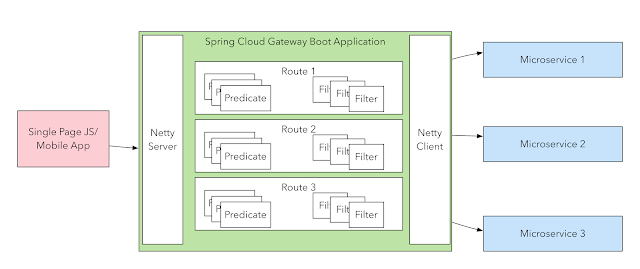 This is how to do it
- Spring Cloud Gateway Routing Predicate Factories
- GitHub from previous post
- / spring-cloud-gateway-sample
- Exploring the New Spring Cloud Gateway
- Configuring a Simple Route on your SPA UI
- Defining a Route with the Fluent API
- Spring Cloud Gateway allows us to define custom predicates
- how to use the built-in predicates to implement basic routing rules.
- About lambda's and predicates
- Consumers and Producers applied
Securing Services with Spring Cloud Gateway
Spring Cloud Gateway aims to provide a simple, yet effective way to route to APIs and provide cross cutting concerns to them such as: security, monitoring/metrics, and resiliency. The diagram below shows the overall system design. It consists of a network of three services: a Single Sign-On Server, an API Gateway Server, and a Resource Server.
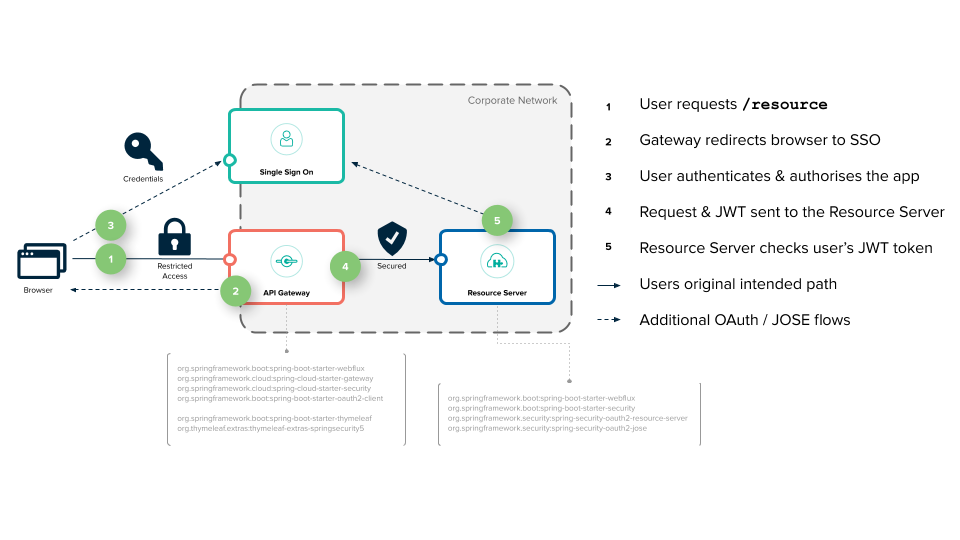
- Spring Cloud Gateway with OpenID Connect
- Securing Services with Spring Cloud Gateway
- Keycloak & Spring Cloud Gateway
CQRS with Apache Axon
CQRS on itself is a very simple pattern. It only describes that the component of an application that processes commands should be separated from the component that processes queries. Although this separation is very simple on itself, it provides a number of very powerful features when combined with other patterns. Axon provides the building block that make it easier to implement the different patterns that can be used in combination with CQRS.
The diagram below shows an example of an extended layout of a CQRS-based event driven architecture. The UI component, displayed on the left, interacts with the rest of the application in two ways: it sends commands to the application (shown in the top section), and it queries the application for information (shown in the bottom section).
Saga Pattern Implementation with Axon and Spring Boot
Saga Pattern is a direct result of Database-per-service pattern. In Database-per-service pattern, each service has its own database. In other words, each service is responsible only for its own data.This leads to a tricky situation. Some business transactions require data from multiple services. Such transactions may also need to update or process data across services. Therefore, a mechanism to handle data consistency across multiple services is required.
- part 1
- Spring Boot Microservices – Fastest Production Ready Microservices
- About Saga
- Saga pattern
- Axon Apache
- Saga pattern with Springboot and Active MQ
- CQRS stands for Command and Query Responsibility Segregation
- Saga Pattern in Microservices | Baeldung on Computer Science
- Sagas - Axon Reference Guide (axoniq.io)
- Running Axon Server - CQRS and Event Sourcing in Java (infoq.com)
- Event-Driven Microservices with Axon (axoniq.io)
- CQRS, microservices and event-driven architecture with Axon. | by George | Medium
- Distributed microservices with Event Sourcing and CQRS | by Eric Bach | Medium
Handling SAGA in MSA -> EventSource pattern
A service must atomically update the database and send messages in order to avoid data inconsistencies and bugs. However, it is not viable to use a traditional distributed transaction (2PC) that spans the database and the message broker to atomically update the database and publish messages/events. The message broker might not support 2PC. And even if does, it’s often undesirable to couple the service to both the database and the message.
XP development, back to the practise of software development
The general characteristics where XP is appropriate were described by Don Wells on www.extremeprogramming.org:
- Dynamically changing software requirements
- Risks caused by fixed time projects using new technology
- Small, co-located extended development team
- The technology you are using allows for automated unit and functional tests
OpenTracing API
Now often deployed in separate containers it became obvious we need a way to trace transactions through various microservice layers, from the client all the way down to queues, storage, calls to external services, etc. This created a new interest in Transaction Tracing that, although not new, has now re-emerged as the third pillar of observability.
Spring 5 WebClient
Prior to Spring 5, there was RestTemplate for client-side HTTP access. RestTemplate, which is part of the Spring MVC project, enables communication with HTTP servers and enforces RESTful principles.
Spring Framework 5 introduces WebClient, a component in the new Web Reactive framework that helps build reactive and non-blocking web applications. Simply put, WebClient is an interface representing the main entry point for performing web requests.
- Baeldung WebClient
- The gurus about WebClient
- Dzone WebClient and testing
- Good read StackOverflow
- Good tutorial
- Another good tutorial
- Reactor reference documentation.
- Mono<List<T>> difference with Flux<T> in Spring webflux
- Modularizing a Spring Boot Application
- Spring MVC Handler
- Rest Template interceptors
WebClient and Oauth OIDC
Spring Security 5 provides OAuth2 support for Spring Webflux's non-blocking WebClient class.
- Spring WebClient and OAuth2
- OAuth2 with Spring WebClient
- Spring Boot and OAuth2
- Exploring the new Spring Security OAuth 2.0 and OpenID connect part 1
- Exploring the new Spring Security OAuth 2.0 and OpenID Connect
- Authorization Code Flow
- Client Credentials Flow
- Authorization Code Flow in action
- Client Credentials Flow in action
Keycloak and Istio
Istio is an platform that provides a common way to manage your service mesh. You may wonder what a service mesh is, well, it's an infrastructure layer dedicated to connect, secure and make reliable your different services.
Istio, in the end, will be replacing all of our circuit-breakers, intelligent load balancing or metrics librairies, but also the way how two services will communicate in a secure way. And this is of course the interesting part for Keycloak.
- combining Keycloak with Istio
- What is the future of OAuth 2.0 support in Spring Security?
- OAuth 2.0 Features Matrix
- JWS and JWK
Building Docker Images without Docker
Kaniko is a project launched by Google that allows building Dockerfiles without Docker or the Docker daemon.
Kaniko can be used inside Kubernetes to build a Docker image and push it to a registry, supporting Docker registry, Google Container Registry and AWS ECR, as well as any other registry supported by Docker credential helpers.
This solution is still not safe, as containers run as root, but it is way better than mounting the Docker socket and launching containers in the host. For one there are no leaked resources or containers running outside the scheduler.
Build Docker images without Docker - using Kaniko, Jenkins and Kubernetes
Jenkins is a hugely popular build tool that has been around for ages and used by many people. With huge shift to Kubernetes as a platform you would naturally want to run jenkins on Kubernetes. While running Jenkins in itself on Kubernetes is not a challenge, it is a challenge when you want to build a container image using jenkins that itself runs in a container in the Kubernetes cluster.
An alternative would be Kaniko which provides a clean approach to building and pushing container images to your repository.
- Instructions from Cloudbees you definitely should read on Kaniko
- Setting up jenkins
-
What you need to know when using Kaniko from Kubernetes Jenkins Agents
- Continuous Development with Java and Kubernetes
Speed up Kubernetes development with Cloud Code
Get a fully integrated Kubernetes development, deployment, and debugging environment within your IDE. Create and manage clusters directly from within the IDE. Under the covers Cloud Code for IDEs uses popular tools such as Skaffold, Jib and Kubectl to help you get continuous feedback on your code in real time. Debug the code within your IDEs using Cloud Code for Visual Studio Code and Cloud Code for IntelliJ by leveraging built-in IDE debugging features.
- Announcing Cloud Code—accelerating cloud-native application development
- Cloud Code about
- Google launches Cloud Code to make cloud-native development easier
- Watch video on developing on kubernetes with Google Cloud Code
- Intellij plugin
- Check the Google Cloud Code examples on github
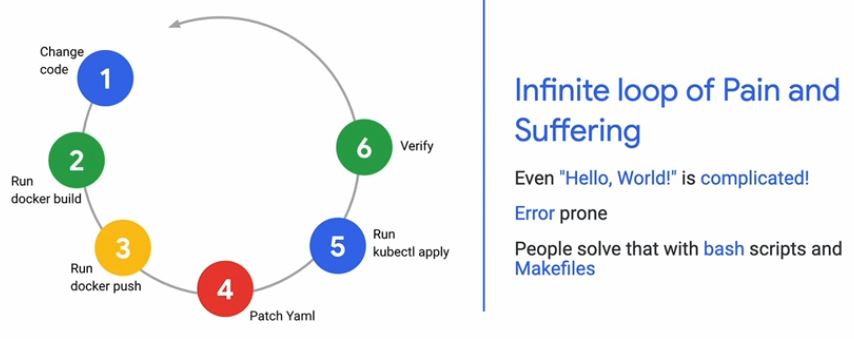
Prevent the LoP - simply skaffold dev
Open Container Initiative and OCI
This specification defines an OCI Image, consisting of a manifest, an image index (optional), a set of filesystem layers, and a configuration. The goal of this specification is to enable the creation of interoperable tools for building, transporting, and preparing a container image to run.
"Distroless" images contain only your application and its runtime dependencies. They do not contain package managers, shells or any other programs you would expect to find in a standard Linux distribution.
Why should I use distroless images?
Restricting what's in your runtime container to precisely what's necessary for your app is a best practice employed by Google and other tech giants that have used containers in production for many years. It improves the signal to noise of scanners (e.g. CVE) and reduces the burden of establishing provenance to just what you need.
Skaffold
Skaffold is a command line tool that facilitates continuous development for Kubernetes applications. You can iterate on your application source code locally then deploy to local or remote Kubernetes clusters. Skaffold handles the workflow for building, pushing and deploying your application. It also provides building blocks and describe customizations for a CI/CD pipeline.
Like Draft, it can also be used as a building block in a CI/CD pipeline to leverage the same workflow and tooling when you are moving an application into production. Read Draft vs. Skaffold: Developing on Kubernetes
Read Faster Feedback for Delivery Pipelines with Skaffold or Continuous Development with Java and Kubernetes
Test the structure of your images before deployment: Container structure tests are defined per image in the Skaffold config. Every time an artifact is rebuilt, Skaffold runs the associated structure tests on that image. If the tests fail, Skaffold will not continue on to the deploy stage. If frequent tests are prohibitive, long-running tests should be moved to a dedicated Skaffold profile. read
Continuous Development with Java and Kubernetes
JIB — build Java Docker images better (Java Image Builder JIB)
Containers are bringing Java developers closer than ever to a "write once, run anywhere" workflow, but containerizing a Java application is no simple task: You have to write a Dockerfile, run a Docker daemon as root, wait for builds to complete, and finally push the image to a remote registry. Not all Java developers are container experts; what happened to just building a JAR?
- Fast - Deploy your changes fast. Jib separates your application into multiple layers, splitting dependencies from classes. Now you don’t have to wait for Docker to rebuild your entire Java application - just deploy the layers that changed
- Reproducible - Rebuilding your container image with the same contents always generates the same image. Never trigger an unnecessary update again.
- Daemonless - Reduce your CLI dependencies. Build your Docker image from within Maven or Gradle and push to any registry of your choice. No more writing Dockerfiles and calling docker build/push.
- Read Introducing Jib — build Java Docker images better and from the source. and finally read Baeldung on Jib
- Jib: Getting Expert Docker Results Without Any Knowledge of Docker
- "Distroless" images contain only your application and its runtime dependencies. They do not contain package managers, shells or any other programs you would expect to find in a standard Linux distribution.
- How to use JibMaven builders on skaffold.
- Google sample Jib project on github
- Read the skaffold dev home page
- FQA on JIB
Kubernetes plugin for Jenkins
Implement a Jenkins scalable infrastructure on top of Kubernetes, in which all the nodes for running the build will spin up automatically during builds execution, and will be removed right after their completion.
- Kubernetes plugin for Jenkins
- Kubernetes plugin pipeline examples
- How to Setup Scalable Jenkins on Top of a Kubernetes Cluster
- Scaling Docker enabled Jenkins with Kubernetes
- About DevOps 2.4 Toolkit: Continuous Deployment on k8s
Kubernetes Monitoring with Prometheus
Prometheus is the “must have” monitoring and alerting tool for Kubernetes and Docker. Moving from bare metal server to the cloud, I had time to investigate the proactive monitoring with k8s. The k8s project has already embraced this amazing tool, by exposing Prometheus metrics in almost all of the components.
Monitoring your k8s cluster will help your team with:
- Proactive monitoring
- Cluster visibility and capacity planning
- Trigger alerts and notification, Built-in Alertmanager—sends out notifications via a number of methods based on rules that you specify. This not only eliminates the need to source an external system and API, but it also reduced the interruptions for your development team.
- Metrics dashboards
Things to read...
- Monitoring Kubernetes with Prometheus
- Kubernetes monitoring with Prometheus in 15 minutes
- Alertmanager (Prometheus) notification configuration in Kubernetes
- From the core...
Springboot logs in Elastic Search with FluentD (ISTIO)
If you deploy a lot of micro-services with Spring Boot (or any other technology), you will have a hard time collecting and making sense of the all logs of your different applications. A lot of people refer to the triptych Elastic Search + Logstash + Kibana as the ELK stack. In this stack, Logstash is the log collector. Its role will be to redirect our logs to Elastic Search. The ISTIO setup requires to send your custom logs to a Fluentd daemon (log collector). Fluentd is an open source log collector that supports many data outputs and has a pluggable architecture.
- ISTIO Logging with Fluentd
- Container and Service Mesh Logs
- Spring boot logs in Elastic Search with fluentd
- Github Springboot fluentd example
Kubernetes monitoring with Prometheus
As from Spring Boot 2.0, Micrometer is the default metrics export engine. Micrometer is an application metrics facade that supports numerous monitoring systems. Atlas, Datadog, Prometheus, etc. to name a few (as we will be using Prometheus in this tutorial, we will be focusing on Prometheus only).
- Monitoring Using Spring Boot 2.0, Prometheus part 1 nice example of Function.apply
- Monitoring Using Spring Boot 2.0, Prometheus part 2
- Kubernetes monitoring with Prometheus in 15 minutes
About Init Containers
You may be familiar with a concept of Init scripts — programs that configure runtime, environment, dependencies, and other prerequisites for the applications to run. Kubernetes implements similar functionality with Init containers that run before application containers are started. In order for the main app to start, all commands and requirements specified in the Init container should be successfully met. Otherwise, a pod will be restarted, terminated or stay in the pending state until the Init container completes.
A common use-case is to pre-populate config files specifically designed for a type of environment like test or production. Similarly to app containers, Init containers use Linux namespaces. Because these namespaces are different from the namespaces of app containers, Init containers end up with their unique filesystem views. You can leverage these filesystem views to give Init containers access to secrets that app containers cannot access. Typically init containers could pull application configuration from a secured environment and provide that config on a Volume that the init container and the application share. This is typically accomplished by defining a emptyDir volume at the Pod level. Containers in the Pod can all read and write the same files in the emptyDir volume, in this case, holding files that configuration-manager (Init Container) provisions while the app Container serves that data to load its configurations.
- Understanding init containers
- Create a Pod that has an Init Container
- Using InitContainers to pre-populate Volume data in Kubernetes
- Kubernetes init containers by example
- Introduction to Init Containers in Kubernetes
About Istio
When building microservice based application, a myriad of complexities arises, we need Service Discovery, Load balancing, Authentication and RBAC role based access. Istio provides capabilities for traffic monitoring, access control, discovery, security, observability through monitoring, and logging and other useful management capabilities to your deployed services. It delivers all that and does not require any changes to the code of any of those services. A great read and complete walkthrough and another one on dzone. Important part of Istio is providing observability and get monitoring data without any in-process instrumentation, read more about using OpenTracing with Istio/Envoy.
- Istio vs Spring and MircoProfile frameworks
- Container Platform Security at Cruise - similarities with ISTIO
- Building a Container Platform at Cruise
- How that relates to security concepts in ISTIO
Spring and more...
REST has quickly become the de-facto standard for building web services on the web because they’re easy to build and easy to consume.
- Building REST services with Spring
- Basic authentication with Spring Security 5
- Understanding requestMatchers()
- DZone about component scanners
- Scanning at Baeldung
- Autoconfiguration
- Springboot under hood
Spring Boot performance tuning
While developing a Spring Boot application is rather easy, tuning the performance of a Spring Boot application is a more challenging task, as, not only it requires you to understand how the Spring framework works behind the scenes, but you have to know what is the best way to use the underlying data access framework, like Hibernate for instance.
- Spring Boot performance tuning
- Understanding the cache abstraction
- A Guide To Caching in Spring
- Caching Data with Spring
- The caching logic is applied transparently, without any interference to the invoker
- Getting Started with Caching in Spring Boot Applications
- What are the best Cache practices in ehcache or spring cache for spring MVC?
- Or simply read the complete reference docus
- Spring bean thread safety guide
- About functions
Configuration management with SALT
In late May 2011 initial progress was made toward the delivery of configuration management built on the Salt remote execution engine.[3] This configuration management system stores all configuration (state) data inside an easily understood data structure that leverages YAML. Salt could be used as part of a Continuous Integration/Continuous Deployment (CI/CD) pipeline. Once a new version of some software has been tagged, a post-commit git hook initiates a call to the SaltStack API to provision infrastructure for testing.